Jolt
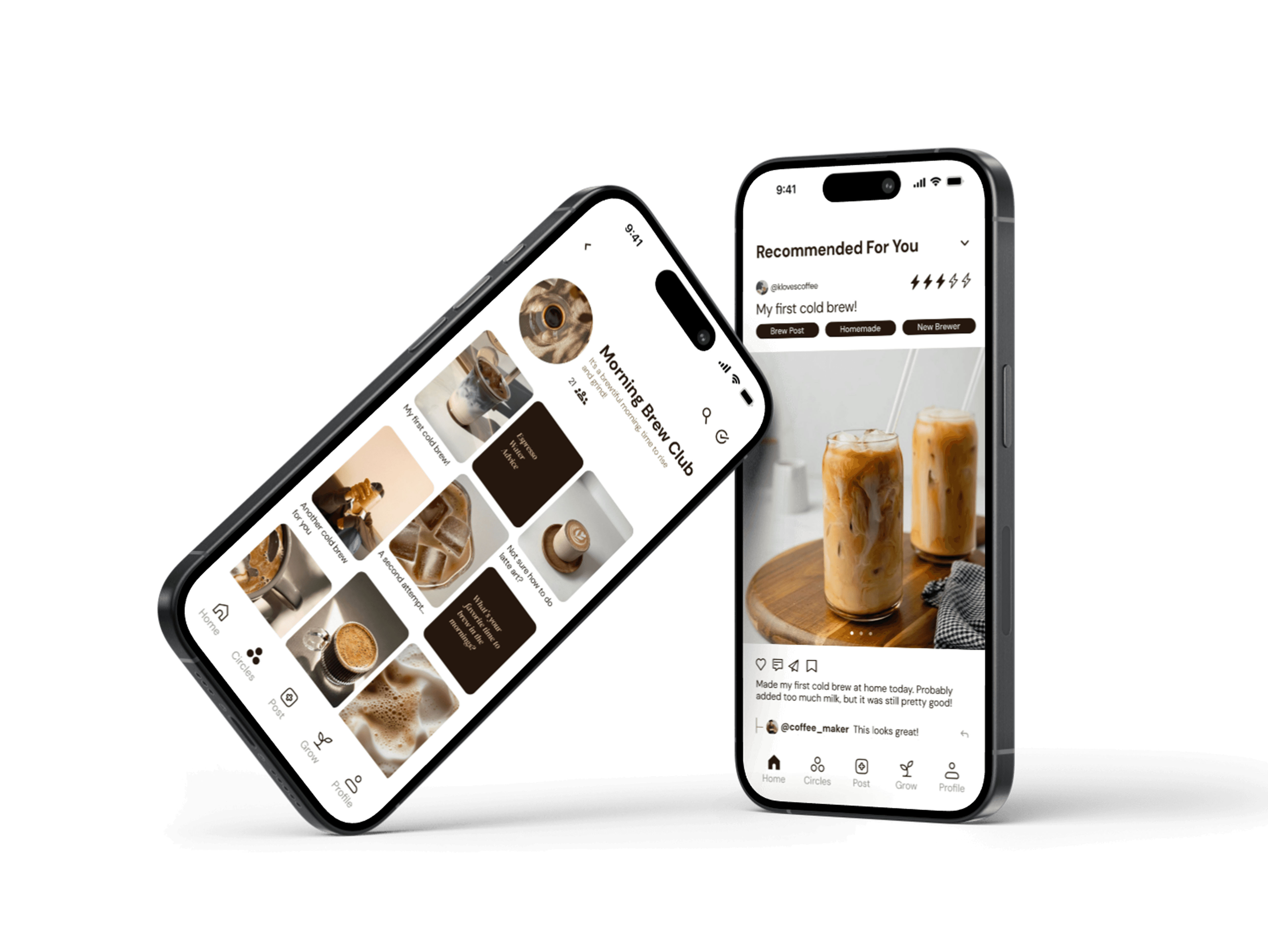
Jolt is an award winning community-powered platform, helping brewers learn and grow in their coffee brewing skills through shared advice & experiences.
Role
Team
Duration
Tools
Product
Designer
Design
Interactive
Cohort
Figma
Figjam
Qualtrics
October -
December
2025

Introduction
Design Interactive’s Cohort organizers gave our team the following prompt:
Aspiring home coffee brewers are looking to improve their skills, but learning how to make the perfect cup can be overwhelming, inconsistent, and isolating. While the process can be meditative, there is no clear path to develop mastery, receive feedback to diagnose mistakes, or gain a supportive community to share their hobby with. As a result, many brewers are discouraged to start, rely on trial-and-error, or plateau in their progress.
How might we support aspiring home brewers to grow their skills and fall in love with making a great cup of coffee?
Our team was tasked to design an app that would support brewers in their coffee brewing journey and help them ultimately grow as brewers.
After conducting research and talking to brewers about their needs, we designed Jolt to be community oriented. We found people wanted to learn from others. Users can record and post their brews, join circles to share with others, and connect with people who share their brewing interests. Alongside community learning, Jolt utilizes user data and an AI model to provide personalized insights to users that highlight patterns, suggest improvements, and guide their growth.
By combining community support with AI-powered recommendations, Jolt gives every user a clear, supportive path to becoming a better brewer.
If you would like to view our process and follow along, here is the link to the prototype as well as the final presentation slides that we presented in front of a panel of judges on presentation day!
Responsibilities
Our team consisted of three product designers Kaitlyn Chang, Anjali Ravi, project manager Edyn Stepler, and me, Eric Le. After the core solution was defined, each designer led the vision and execution for specific features:
Kaitlyn led the design for the home page and the circles page.
I led the vision for designing a seamless onboarding experience and the post-creation flow.
Anjali led the design for the growth page and account page.
Research, Methods, Surveys
Our goal was to gain insights to better understand what brewers want and their struggles so that we could design to best support them and their brewing journey.
Our team conducted research by creating surveys and interviewing brewers to gather both quantitative and qualitative data. We aimed to fully understand the needs, wants, and struggles of brewers, while also exploring key questions such as how they learn, how to differentiate those who are motivated to improve their skills from those who make coffee out of necessity, and what drives their engagement with brewing.
We conducted a survey with our school community, fellow coffee enthusiasts, and online coffee forums, gathering 33 responses. Some key findings we gathered were:
73%
94%
Of people are open to growing their knowledge in coffee
Of people would most like to learn about brewing from friends and family
User Interviews
Our team also met with 10 coffee brewers to learn more about their needs and frustrations. Some key findings from our research showed that most people learned to brew through family, friends, or social media, but many often feel stuck and want clear, actionable guidance to improve.
Coffee brewing is also a science that requires trial and error and careful tracking, which often causes people to hit a plateau because they are not sure what to adjust in their process.
We were starting to see a pattern: people wanted to improve their brew knowledge through people in their community.

Key Demographics
From our research, we found that people who are just beginning their home brewing journey and are still figuring out their process tend to be more eager to learn and improve. Many in this group are around 18-30 years old.
They would benefit most from an app that helps them experiment, develop their skills, and refine their coffee brewing at home. They also showed strong interest in a tool specifically designed to support their brewing journey.
Ideation
The insights from our research helped lay the foundation for us to start building our app. With so many ideas in mind, we moved on to some brainstorming activities to help us narrow them down.
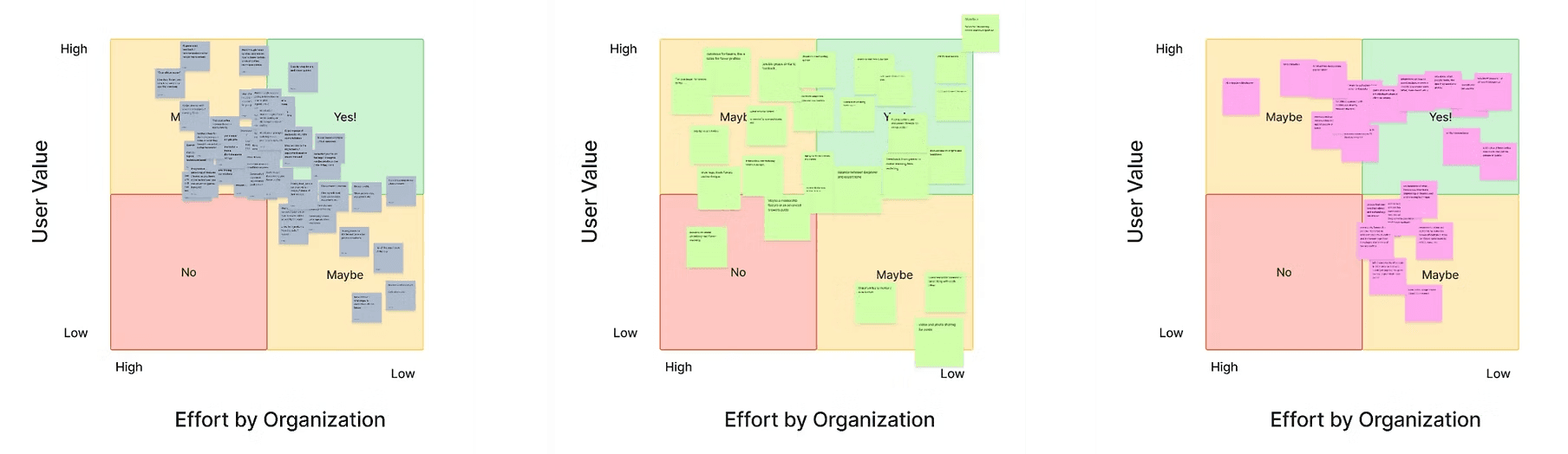
Feature Matrix
Each of our team members jotted down our initial ideas for potential features. We then organized all of our ideas into feature matrices to see which ones were the most feasible.
From this, we determined that our top features included:
Home - A place to view the main feed and discover new posts
Learn - Tutorials and other ways to learn and grow skills
Posts - For users to share their brews and interact with others
Saved - A library for users to save their favorite posts
Community - Groups for users to join, share, and learn from each other.
Mid Fi
In the lo-fi phase, the wide range of feature ideas made it difficult to define the app’s core values and determine what to prioritize. Through research, we realized users were most motivated by learning through community rather than technical tools. This insight guided the transition from paper sketches to digital wireframes and led to a more focused, community-centered experience, including the creation of circles for discussion, feedback, and sharing brews.
In our mid-fi phase, we continued iterating on different areas of the app. We experimented with displaying the posts people make in the circles to accommodate both image-based posts and text-only question posts. We also refined the growth/insights, focusing on making insights more actionable and supportive of skill development.
Usability Testing
We conducted two rounds of usability testing. The first round with five participants and the second round with four participants.
Usability testing provided key takeaways that drove significant changes in our prototype, ensuring alignment with user needs:
To maintain high-value content, we implemented a model for crowdsourced technical advice/feedback, similar to successful platforms like Reddit.
We initially incorporated features like counts and post performance analytics. However, recognizing that these encourage users to focus on becoming influencers rather than authentic learning, we deliberately decided to move away from those features in the final prototype.
Mid Fi to Hi Fi
The transition from mid-fidelity to high-fidelity was focused on design system application, refining Jolt’s visual hierarchy, and improving usability. Based on feedback we received during usability testing, we targeted two key screens, the Home Feed and the Insights Page, to showcase the practical impact of the final polish and feature adjustments.
Home Page
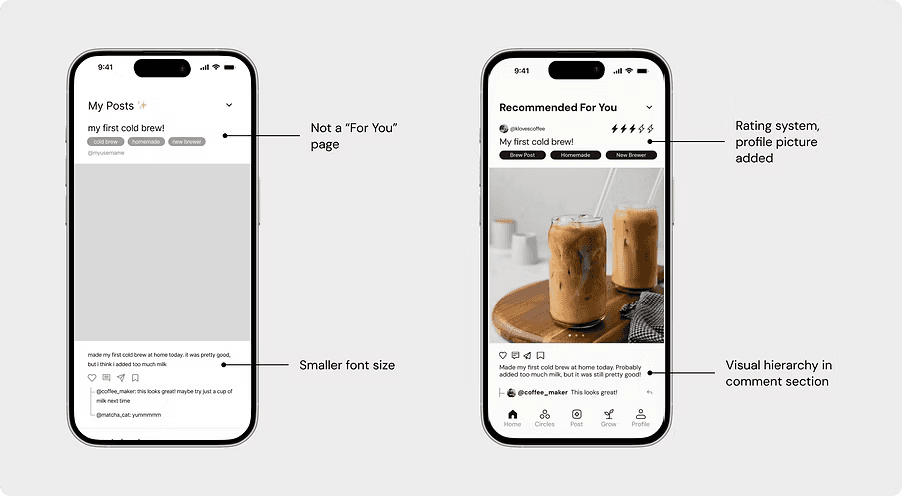
The mid-fidelity Home Feed originally functioned as a "My Posts" page, displaying only the user's own posts. We decided that personal content belonged on the profile page, & made these changes:
The page was converted into a "For You" feed, displaying a stream of community posts. This change was made to reflect the app’s community-orientation right from the entry point.
Visual Refinement: We added a rating system for users to grade their own brews, & enforced consistent text styles.
Cohesive Navigation: The navigation bar was styled using the high-contrast dark brown color for active states.
Growth/Insights Page
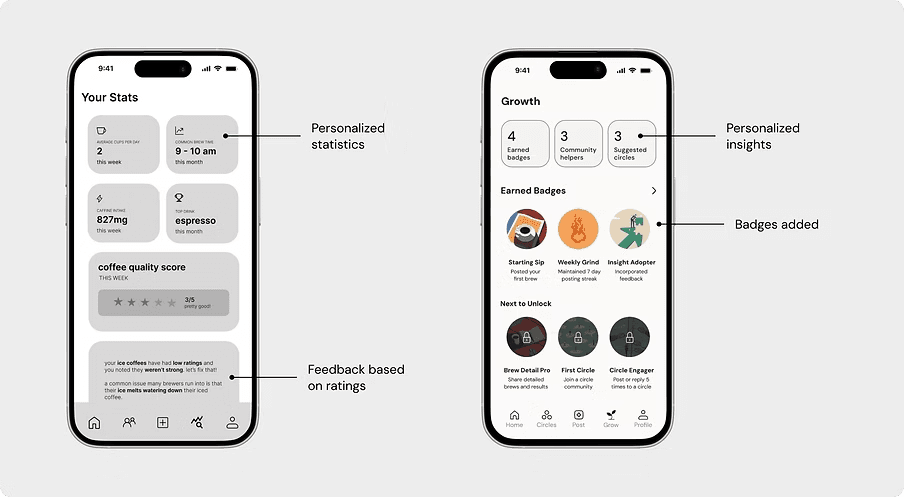
The Growth/Insights Page underwent a complete functional rework in the transition to high-fidelity. It originally included personalized statistics, graphs, and charts intended to display brewing data (e.g., specific metrics of a user's coffee brews).
We recognized that this data would be difficult to consistently obtain since not all users would reliably log the necessary technical metrics of their brews. This technical hurdle and potential user burden made the original insights page impractical.
Instead of manual data logging, we pivoted the screen to focus on AI personalized feedback paired with a badge system for gamification. This new approach still encourages growth and engagement without requiring laborious data input from the user, offering a scalable and motivating alternative.
Hi Fi and the Design System
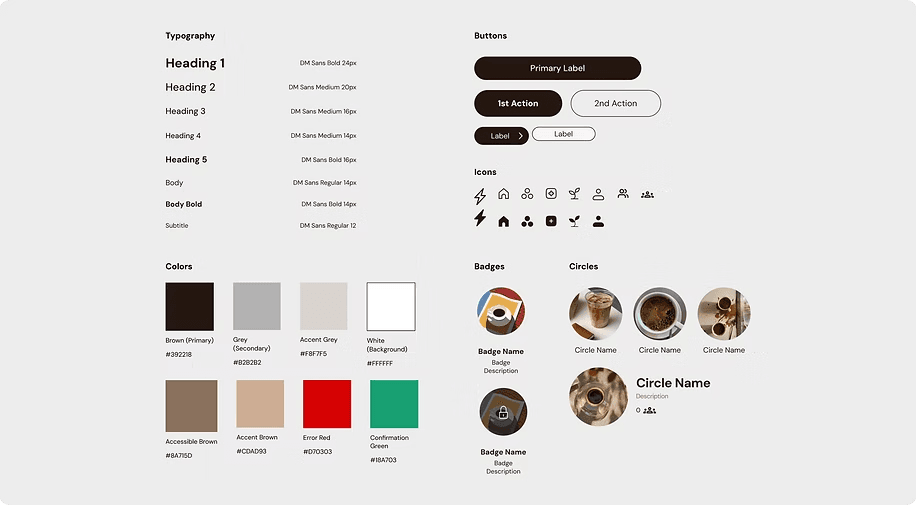
The design system was designed around the expectations and preferences of our core audience: young adults (18-30) who value a clean and intuitive application experience.
Typography and Hierarchy
Font Selection:
DM Sans was selected as the typeface for the entire application. Its friendly feel and excellent readability were key factors. Additionally, its wide range of weights provided the necessary flexibility for establishing clear headings and arranging the visual hierarchy of all displayed text.
Consistency:
To maintain uniformity, we incorporated text styles in Figma. This ensured that all forms of text, including headings, subheadings, body text, and labels, were visually consistent across the entire application.
Color and Contrast
Color Palette:
To reflect the app's established "coffee roots," we chose a color palette centered on a dark brown. This specific shade was selected because it is both warm and offers high contrast, contributing to a welcoming aesthetic.
Call-to-Action (CTA) Focus:
he dark brown color was strategically utilized for buttons and icons. This created strong, high-contrast CTAs, ensuring the interface felt both cohesive and highly usable.
Consistency and Layout
Spacing and Layout Rules:
To guarantee visual consistency across every screen, we implemented strict rules for spacing and layout:
Rule of 4’s:
We followed the rule of 4’s when determining padding and spacing measurements throughout the design system.
Consistent Margins:
The margins of every page were standardized and kept the same to provide a predictable and balanced visual experience.
Challenges
The priority is to make the app immediately more useful and engaging. This includes adding a café map so users can easily find nearby spots, and implementing stronger community tools such as post sharing and direct messaging. These additions are essential for boosting user engagement and solidifying Jolt's community-oriented identity.
Feature Additions
Before scaling, rigorous testing is required. The next step involves conducting dedicated usability tests to refine the existing flows and checking for accessibility issues. This ensures that the app is comfortable, intuitive, and usable for the broadest possible audience.
2. Testing and Refining
Once the features and usability are validated, the focus shifts to sustainability. This phase involves exploring partnerships with local cafés and mapping out long-term growth by investigating revenue options (like ads or sponsorships). The ultimate goal is transforming Jolt into a reliable, indispensable tool.
3. Implementation and Business Considerations
Final Thoughts
Jolt began as a challenge to bridge the gap between a solo hobby and a shared craft. By shifting our focus from technical tracking to community-led learning, we transformed a complex process into an approachable journey. This project reinforced my belief that the most effective digital spaces are environments that foster growth, connection, and confidence.
Thank you for reading this case study!

Jolt
Jolt is an award winning community-powered platform, helping brewers learn and grow in their coffee brewing skills through shared advice & experiences.
Design
Interactive
Cohort
Team
Role
Product
Designer
Tools
Figma
Figjam
Qualtrics
Duration
October -
December
2025
Introduction
If you would like to view our process and follow along, here is the link to the prototype as well as the final presentation slides that we presented in front of a panel of judges on presentation day!
Responsibilities
Our team consisted of three product designers Kaitlyn Chang, Anjali Ravi, project manager Edyn Stepler, and me, Eric Le. After the core solution was defined, each designer led the vision and execution for specific features:
Kaitlyn led the design for the home page and the circles page.
I led the vision for designing a seamless onboarding experience and the post-creation flow.
Anjali led the design for the growth page and account page.
Research, Methods, Surveys
Our goal was to gain insights to better understand what brewers want and their struggles so that we could design to best support them and their brewing journey.
Our team conducted research by creating surveys and interviewing brewers to gather both quantitative and qualitative data. We aimed to fully understand the needs, wants, and struggles of brewers, while also exploring key questions such as how they learn, how to differentiate those who are motivated to improve their skills from those who make coffee out of necessity, and what drives their engagement with brewing.
We conducted a survey with our school community, fellow coffee enthusiasts, and online coffee forums, gathering 33 responses. Some key findings we gathered were:
94%
Of people are open to growing their knowledge in coffee
73%
Of people would most like to learn about brewing from friends and family
User Interviews
Our team also met with 10 coffee brewers to learn more about their needs and frustrations. Some key findings from our research showed that most people learned to brew through family, friends, or social media, but many often feel stuck and want clear, actionable guidance to improve.
Coffee brewing is also a science that requires trial and error and careful tracking, which often causes people to hit a plateau because they are not sure what to adjust in their process.
We were starting to see a pattern: people wanted to improve their brew knowledge through people in their community.
Key Demographics
From our research, we found that people who are just beginning their home brewing journey and are still figuring out their process tend to be more eager to learn and improve. Many in this group are around 18-30 years old.
They would benefit most from an app that helps them experiment, develop their skills, and refine their coffee brewing at home. They also showed strong interest in a tool specifically designed to support their brewing journey.
Ideation
The insights from our research helped lay the foundation for us to start building our app. With so many ideas in mind, we moved on to some brainstorming activities to help us narrow them down.
Feature Matrix
Mid Fi
Usability Testing
We conducted two rounds of usability testing. The first round with five participants and the second round with four participants.
Usability testing provided key takeaways that drove significant changes in our prototype, ensuring alignment with user needs:
To maintain high-value content, we implemented a model for crowdsourced technical advice/feedback, similar to successful platforms like Reddit.
We initially incorporated features like counts and post performance analytics. However, recognizing that these encourage users to focus on becoming influencers rather than authentic learning, we deliberately decided to move away from those features in the final prototype.
Mid Fi to Hi Fi
Home Page
The mid-fidelity Home Feed originally functioned as a "My Posts" page, displaying only the user's own posts. We decided that personal content belonged on the profile page, & made these changes:
The page was converted into a "For You" feed, displaying a stream of community posts. This change was made to reflect the app’s community-orientation right from the entry point.
Visual Refinement: We added a rating system for users to grade their own brews, & enforced consistent text styles.
Cohesive Navigation: The navigation bar was styled using the high-contrast dark brown color for active states.
Growth/Insights Page
The Growth/Insights Page underwent a complete functional rework in the transition to high-fidelity. It originally included personalized statistics, graphs, and charts intended to display brewing data (e.g., specific metrics of a user's coffee brews).
We recognized that this data would be difficult to consistently obtain since not all users would reliably log the necessary technical metrics of their brews. This technical hurdle and potential user burden made the original insights page impractical.
Instead of manual data logging, we pivoted the screen to focus on AI personalized feedback paired with a badge system for gamification. This new approach still encourages growth and engagement without requiring laborious data input from the user, offering a scalable and motivating alternative.
Hi Fi and the Design System
Typography and Hierarchy
The design system was designed around the expectations and preferences of our core audience: young adults (18-30) who value a clean and intuitive application experience.
Font Selection:
DM Sans was selected as the typeface for the entire application. Its friendly feel and excellent readability were key factors. Additionally, its wide range of weights provided the necessary flexibility for establishing clear headings and arranging the visual hierarchy of all displayed text.
Consistency:
To maintain uniformity, we incorporated text styles in Figma. This ensured that all forms of text, including headings, subheadings, body text, and labels, were visually consistent across the entire application.
Color and Contrast
Color Palette:
To reflect the app's established "coffee roots," we chose a color palette centered on a dark brown. This specific shade was selected because it is both warm and offers high contrast, contributing to a welcoming aesthetic.
Call-to-Action (CTA) Focus:
he dark brown color was strategically utilized for buttons and icons. This created strong, high-contrast CTAs, ensuring the interface felt both cohesive and highly usable.
Consistency and Layout
Spacing and Layout Rules:
To guarantee visual consistency across every screen, we implemented strict rules for spacing and layout:
Rule of 4’s:
We followed the rule of 4’s when determining padding and spacing measurements throughout the design system.
Consistent Margins:
The margins of every page were standardized and kept the same to provide a predictable and balanced visual experience.
Challenges
Feature Additions
2. Testing and Refining
Once the features and usability are validated, the focus shifts to sustainability. This phase involves exploring partnerships with local cafés and mapping out long-term growth by investigating revenue options (like ads or sponsorships). The ultimate goal is transforming Jolt into a reliable, indispensable tool.
Final Thoughts
Jolt began as a challenge to bridge the gap between a solo hobby and a shared craft. By shifting our focus from technical tracking to community-led learning, we transformed a complex process into an approachable journey. This project reinforced my belief that the most effective digital spaces are environments that foster growth, connection, and confidence.
Thank you for reading this case study!
Design Interactive’s Cohort organizers gave our team the following prompt:
Aspiring home coffee brewers are looking to improve their skills, but learning how to make the perfect cup can be overwhelming, inconsistent, and isolating. While the process can be meditative, there is no clear path to develop mastery, receive feedback to diagnose mistakes, or gain a supportive community to share their hobby with. As a result, many brewers are discouraged to start, rely on trial-and-error, or plateau in their progress.
How might we support aspiring home brewers to grow their skills and fall in love with making a great cup of coffee?
Our team was tasked to design an app that would support brewers in their coffee brewing journey and help them ultimately grow as brewers.
After conducting research and talking to brewers about their needs, we designed Jolt to be community oriented. We found people wanted to learn from others. Users can record and post their brews, join circles to share with others, and connect with people who share their brewing interests. Alongside community learning, Jolt utilizes user data and an AI model to provide personalized insights to users that highlight patterns, suggest improvements, and guide their growth.
By combining community support with AI-powered recommendations, Jolt gives every user a clear, supportive path to becoming a better brewer.
In the lo-fi phase, the wide range of feature ideas made it difficult to define the app’s core values and determine what to prioritize. Through research, we realized users were most motivated by learning through community rather than technical tools. This insight guided the transition from paper sketches to digital wireframes and led to a more focused, community-centered experience, including the creation of circles for discussion, feedback, and sharing brews.
In our mid-fi phase, we continued iterating on different areas of the app. We experimented with displaying the posts people make in the circles to accommodate both image-based posts and text-only question posts. We also refined the growth/insights, focusing on making insights more actionable and supportive of skill development.
The transition from mid-fidelity to high-fidelity was focused on design system application, refining Jolt’s visual hierarchy, and improving usability. Based on feedback we received during usability testing, we targeted two key screens, the Home Feed and the Insights Page, to showcase the practical impact of the final polish and feature adjustments.
The priority is to make the app immediately more useful and engaging. This includes adding a café map so users can easily find nearby spots, and implementing stronger community tools such as post sharing and direct messaging. These additions are essential for boosting user engagement and solidifying Jolt's community-oriented identity.
Each of our team members jotted down our initial ideas for potential features. We then organized all of our ideas into feature matrices to see which ones were the most feasible.
From this, we determined that our top features included:
Home - A place to view the main feed and discover new posts
Learn - Tutorials and other ways to learn and grow skills
Posts - For users to share their brews and interact with others
Saved - A library for users to save their favorite posts
Community - Groups for users to join, share, and learn from each other.
3. Implementation and Business Considerations
Before scaling, rigorous testing is required. The next step involves conducting dedicated usability tests to refine the existing flows and checking for accessibility issues. This ensures that the app is comfortable, intuitive, and usable for the broadest possible audience.