Pounce
Pounce is a community-powered platform, helping everyone stay consistent and build healthy habits in their fitness journey through shared goals, tracking, and experiences.
Role
Team
Duration
Tools
Design Lead
Design
Interactive
Cohort
Figma
Figjam
Qualtrics
April - June
2026


Introduction
Design Interactive’s Cohort organizers gave our team the following prompt: Individuals looking to improve their health and wellness struggle to stay engaged with fitness apps once the initial novelty wears off. Whether tracking workouts or managing habits, users often feel like the experience stops adapting to them, making tracking feel like an isolating administrative chore. While the desire to stay healthy is there, there is no clear path to sustain motivation, celebrate daily milestones, or gain an uplifting community to share their journey with. As a result, many users are discouraged from continuing, rely on fleeting motivation, and rapidly abandon their routines.
How might we design a fitness experience that keeps users motivated to track, plan, and celebrate their progress?
Our team was tasked to design an app that would support users in their fitness journey and help them ultimately build long-term habits.
After conducting research and talking to users about their needs, we designed Pounce to be community-oriented. We found that people wanted to learn and gain motivation from others rather than tracking in isolation. Users can easily log their daily activity, join Crew Challenges to pursue group fitness goals, and connect with people who share their wellness interests. Alongside community-driven momentum, Pounce utilizes an interactive chat interface and automated progress insights to streamline the tracking process—removing the tedious friction of traditional data entry and highlighting user milestones. By combining an uplifting social environment with effortless tracking, Pounce gives every user a clear, supportive path to staying committed to their fitness goals.
If you would like to view our process and follow along, here is the link to the prototype as well as the final presentation slides that we presented in front of a panel of judges on presentation day!
Responsibilities
Our team initially started out with five members, but after one designer dropped toward the end of the eight weeks, our remaining team of three product designers and one design lead had to pivot. Despite the challenge of restructuring our workload late in the timeline, we successfully aligned to execute the final designs. Once the core solution was defined, each designer took full ownership of the vision and execution for specific features:
Eric Le (Design Lead): Led overall project strategy, timeline management, and cross-functional alignment, as well as designing the Create Workout pages.
Rei Hernandez (Product Designer): Led the design for the social pages and the Pounce AI Chatbot.
Sophie Lin (Product Designer): Led the design for the onboarding experience and the home page.
Lily Lam (Product Designer): Led the design for the statistics page and profile pages.
Our process was a 7-week sprint, starting with research, then ideation, then lo-fis, moving into mid-fis, usability testing, hi-fis, and finally, presentation and handoff.

Research, Methods, Surveys
Our goal during this research process was to find out which field of health and wellness users would be most drawn towards and what their current struggles are to help support them in all ways possible.
With not much prior knowledge of the field, our group started by asking a lot of user research questions to better understand users in this field. We also did interview question mapping to choose the best questions that allow us to gain the best range of information. Additionally, we conducted a competitive analysis on popular apps.
The 47 replies we got from our online survey also backed up the findings from our user interviews.
User Interviews
We conducted 12 one-on-one user interviews with participants aged 18–25. About two-thirds were already using a health app, and over half had quit at least one app previously.
A clear theme emerged: users weren't looking for more features. They wanted simplicity. Less of a productivity tool, more of a supportive companion. Three ideas came up consistently across all 12 interviews: keep it simple, make progress visible, and make it feel personal.
The data backed this up. 42% of users had abandoned apps once a paid subscription kicked in, and 50% cited apps being "too complicated" or requiring too much manual logging as their reason for leaving. A clean, visually distinct UI was also essential; users were tired of the same dark, cluttered interfaces and wanted something fresh and easy to navigate.
Competitive Analysis
For our competitive analysis, we examined three apps currently popular in the space: Strava, MyFitnessPal, and Headspace. Together, they painted a clear picture of where the market stands today.
Taking a closer look at Strava, we found that while the app offers clear, goal-driven systems, it comes at the cost of high cognitive load, making it more demanding than intuitive for everyday users.
MyFitnessPal also has a really strong community-driven engagement (social feed, likes, comments), but this can be intimidating for beginners or casual users.
Ideation
We began our ideation phase away from the screen, using FigJam to run rapid brainstorming sessions and sketch out early user flows. Moving from abstract research data to concrete layouts required us to map out the user journey from the ground up, starting with an extensive user affinity mapping session to cluster our interview and survey findings into clear, actionable themes.
From these clusters, we moved into user persona creation, developing target profiles that kept us grounded in the real-world needs of casual exercisers and beginners. We focused heavily on how our personas would transition from their initial setup to daily interaction with the app.
To ensure our execution stayed realistic, we mapped our raw ideas onto a Feature Matrix, weighing user value against our strict 8-week timeline. This matrix helped us separate essential habit-building mechanics from non-essential features that could clutter the interface.
The onboarding sequence and the home dashboard were identified as critical milestones. If onboarding felt intimidating and overwhelming, users would drop off before experiencing the community features. If the home screen felt like an administrative spreadsheet, tracking would feel like a chore.
We spent significant time experimenting with the information architecture to ensure the app felt seamless, deeply personal, and entirely approachable. By mapping out a clean 4-tab system, we kept the Home Dashboard as the primary, comforting anchor point, supported by Social/Crews, Statistics, and Profile—deliberately steering clear of the dense, intimidating navigational structures common to most legacy fitness apps.
Our primary takeaway from these exercises was that clinical, purely metrics-driven data layouts feel cold and intimidating to everyday users. To create a deeply supportive companion app, we decided to embed our mascot, Pounce, as an integral part of the experience.
Personality-Driven Onboarding: We integrated cat-themed micro-copy and playful interactions right from the start to immediately lower cognitive anxiety and make profile setup feel like an intimate and engaging conversation.
A Welcoming Dashboard: We positioned Pounce prominently on the home screen to greet users dynamically upon opening the app, using encouraging, conversational copy like "I'm so proud you're back!" to reinforce positive habit loops.
Empathic AI Assistance: Instead of a robotic, text-only chat interface, we framed the AI advice feature as direct communication from Pounce, turning data tracking and fitness insights into a friendly, approachable dialogue.
Taking the insights from the data, we asked ourselves:
How might we design a fitness experience keeps users motivated to track, plan, and celebrate their progress?
This question became the starting point for our ideation phase, so we started brainstorming how to transform boring fitness apps into a playful and social experience.
Usability Testing
We conducted usability testing with a small group of college students who represented our target audience. Participants had varying levels of fitness experience, allowing us to gather feedback from both casual and active users.
During our high-fidelity prototyping phase, participants were asked to complete two key tasks:
Create a workout group with friends.
Log a new workout using the home screen.
What we found was that while participants successfully completed both tasks, several usability issues emerged:
Users struggled to independently locate the pages needed to complete tasks.
Important information, such as workout statistics and progress metrics, was not immediately visible or easy to access.
Participants responded positively to the Pounce mascot and overall visual design, but many were unclear about its purpose within the experience.
One participant shared:
"The concept is really cute, but as a first-time user I wasn't sure where to begin or how Pounce connected to the experience."
Based on this feedback, we redesigned several screens to improve navigation and information hierarchy. We simplified layouts, surfaced key statistics on primary screens, and made important actions easier to find.
To strengthen the mascot's role within the experience, we introduced a progression system where Pounce grows and levels up alongside the user's fitness journey. This change gave users a clearer understanding of the mascot's purpose while creating an additional source of motivation and engagement.
Incorporating Feedback
The insights gathered from usability testing directly informed our high-fidelity designs. Participants consistently expressed a desire to access key information, such as workout statistics and progress, more quickly. As a result, we restructured the information hierarchy to surface the most important content on primary screens and reduce the number of steps required to reach frequently used features.
We also adopted a more goal-oriented approach to the experience. Since Pounce aims to encourage users to work out with friends, we introduced clearer progress tracking and social motivation features that emphasize achieving fitness goals together. These changes helped align the product experience with users' expectations while reinforcing the app's core value of community-driven fitness.
Design System
To create a cohesive and approachable experience, we developed a design system centered around consistency, accessibility, and motivation.
Quick Looks


Mid Fis

When translating paper concepts into mid-fidelity digital wireframes in Figma, our main priority was establishing structural clarity. We took the rough layouts for the onboarding screens and home dashboard and turned them into clean, grayscale components to test visual hierarchy and user navigation before diving into high-fidelity styling.
Onboarding: We broke the setup process down into bite-sized, interactive cards rather than long, overwhelming forms. Instead of text-heavy inputs, we utilized selectable visual tags for goals and fitness interests. To make the setup feel intimate and customized from the very first tap, we introduced a warm tone and playful, cat-themed micro-copy that introduced users to the app’s personality.
Home Dashboard: For the home screen, we intentionally moved away from dense, exhausting lists. We blocked out distinct visual zones to prioritize immediate information access. This included a prominent daily progress bar, an overview of active goals, and an intuitive, easy-to-find workout logging button.
AI Chatbot: For the AI interface, our structural goal was to remove the cold, empty look of traditional chat windows. In the mid-fi phase, we blocked out a welcoming layout where the chat input was paired with conversational prompts. We designed this space to feel like a supportive dialogue with an assistant rather than a data-entry terminal, ensuring users felt comfortable asking for advice or typing out casual workout summaries.
Social and Community: To directly combat the isolation highlighted in our user interviews, the community layouts were structured to emphasize shared experiences over individual competition. We designed the feed and Crew Challenge interfaces around clean, collaborative cards that highlight group progress bars and shared milestones. This layout ensures that whenever a user navigates to the social tab, the focus is placed squarely on collective momentum and cheering on friends, making fitness feel like a team effort.
Hi-Fi Prototyping

Typography: DM Sans was selected as the primary typeface due to its clean, modern appearance while still maintaining a sense of personality and friendliness.
Color Palette: We used a playful combination of pink, blue, yellow, white, and black to reflect the energy and positivity of exercising with friends. The palette balances a fun, social atmosphere with the clarity expected from health and wellness applications.
Components: Rounded buttons, icons, and cards were used throughout the interface to create a welcoming and approachable experience. We wanted the application to feel encouraging rather than intimidating, especially for users who may be new to fitness.
Layout Principles: Consistent spacing, visual hierarchy, and reusable components ensured that users could navigate the application intuitively while maintaining a unified visual language across all screens.

To view the full prototype, feel free to check out the Figma file! This page will showcase the highlights, but I encourage you to immerse yourself in our finished product!


Pounce
Pounce is a community-powered platform, helping everyone stay consistent and build healthy habits in their fitness journey through shared goals, tracking, and experiences.
Design
Interactive
Cohort
Team
Role
Design
Lead
Tools
Figma
Figjam
Qualtrics
Duration
April -
June
2026
Introduction
If you would like to view our process and follow along, here is the link to the prototype as well as the final presentation slides that we presented in front of a panel of judges on presentation day!
Responsibilities
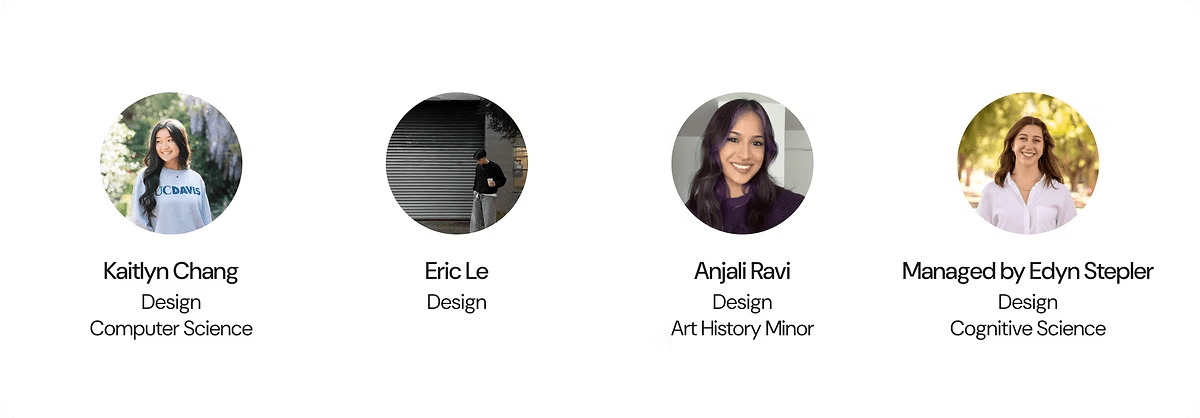
Our team consisted of three product designers Kaitlyn Chang, Anjali Ravi, project manager Edyn Stepler, and me, Eric Le. After the core solution was defined, each designer led the vision and execution for specific features:
Kaitlyn led the design for the home page and the circles page.
I led the vision for designing a seamless onboarding experience and the post-creation flow.
Anjali led the design for the growth page and account page.
Research, Methods, Surveys
Our goal was to gain insights to better understand what brewers want and their struggles so that we could design to best support them and their brewing journey.
Our team conducted research by creating surveys and interviewing brewers to gather both quantitative and qualitative data. We aimed to fully understand the needs, wants, and struggles of brewers, while also exploring key questions such as how they learn, how to differentiate those who are motivated to improve their skills from those who make coffee out of necessity, and what drives their engagement with brewing.
We conducted a survey with our school community, fellow coffee enthusiasts, and online coffee forums, gathering 33 responses. Some key findings we gathered were:
94%
Of people are open to growing their knowledge in coffee
73%
Of people would most like to learn about brewing from friends and family
User Interviews
We conducted 12 one-on-one user interviews with participants aged 18–25. About two-thirds were already using a health app, and over half had quit at least one app previously.
A clear theme emerged: users weren't looking for more features. They wanted simplicity. Less of a productivity tool, more of a supportive companion. Three ideas came up consistently across all 12 interviews: keep it simple, make progress visible, and make it feel personal.
The data backed this up. 42% of users had abandoned apps once a paid subscription kicked in, and 50% cited apps being "too complicated" or requiring too much manual logging as their reason for leaving. A clean, visually distinct UI was also essential; users were tired of the same dark, cluttered interfaces and wanted something fresh and easy to navigate.
Design Interactive’s Cohort organizers gave our team the following prompt:
Individuals looking to improve their health and wellness struggle to stay engaged with fitness apps once the initial novelty wears off. Whether tracking workouts or managing habits, users often feel like the experience stops adapting to them, making tracking feel like an isolating administrative chore. While the desire to stay healthy is there, there is no clear path to sustain motivation, celebrate daily milestones, or gain an uplifting community to share their journey with.
As a result, many users are discouraged from continuing, rely on fleeting motivation, and rapidly abandon their routines.
How might we design a fitness experience that keeps users motivated to track, plan, and celebrate their progress?
Our team was tasked to design an app that would support users in their fitness journey and help them ultimately build long-term habits.
After conducting research and talking to users about their needs, we designed Pounce to be community-oriented. We found that people wanted to learn and gain motivation from others rather than tracking in isolation. Users can easily log their daily activity, join Crew Challenges to pursue group fitness goals, and connect with people who share their wellness interests. Alongside community-driven momentum, Pounce utilizes an interactive chat interface and automated progress insights to streamline the tracking process—removing the tedious friction of traditional data entry and highlighting user milestones. By combining an uplifting social environment with effortless tracking, Pounce gives every user a clear, supportive path to staying committed to their fitness goals.
Design Interactive’s Cohort organizers gave our team the following prompt:
Individuals looking to improve their health and wellness struggle to stay engaged with fitness apps once the initial novelty wears off. Whether tracking workouts or managing habits, users often feel like the experience stops adapting to them, making tracking feel like an isolating administrative chore. While the desire to stay healthy is there, there is no clear path to sustain motivation, celebrate daily milestones, or gain an uplifting community to share their journey with.
As a result, many users are discouraged from continuing, rely on fleeting motivation, and rapidly abandon their routines.
How might we design a fitness experience that keeps users motivated to track, plan, and celebrate their progress?
Our team was tasked to design an app that would support users in their fitness journey and help them ultimately build long-term habits.
After conducting research and talking to users about their needs, we designed Pounce to be community-oriented. We found that people wanted to learn and gain motivation from others rather than tracking in isolation. Users can easily log their daily activity, join Crew Challenges to pursue group fitness goals, and connect with people who share their wellness interests. Alongside community-driven momentum, Pounce utilizes an interactive chat interface and automated progress insights to streamline the tracking process—removing the tedious friction of traditional data entry and highlighting user milestones. By combining an uplifting social environment with effortless tracking, Pounce gives every user a clear, supportive path to staying committed to their fitness goals.
If you would like to view our process and follow along, here is the link to the prototype as well as the final presentation slides that we presented in front of a panel of judges on presentation day!
If you would like to view our process and follow along, here is the link to the prototype as well as the final presentation slides that we presented in front of a panel of judges on presentation day!
Responsibilities
Our team initially started out with five members, but after one designer dropped toward the end of the eight weeks, our remaining team of three product designers and one design lead had to pivot. Despite the challenge of restructuring our workload late in the timeline, we successfully aligned to execute the final designs. Once the core solution was defined, each designer took full ownership of the vision and execution for specific features:
Eric Le (Design Lead): Led overall project strategy, timeline management, and cross-functional alignment, as well as designing the Create Workout pages.
Rei Hernandez (Product Designer): Led the design for the social pages and the Pounce AI Chatbot.
Sophie Lin (Product Designer): Led the design for the onboarding experience and the home page.
Lily Lam (Product Designer): Led the design for the statistics page and profile pages.
Our process was a 7-week sprint, starting with research, then ideation, then lo-fis, moving into mid-fis, usability testing, hi-fis, and finally, presentation and handoff.
Research, Methods, Surveys
Our goal during this research process was to find out which field of health and wellness users would be most drawn towards and what their current struggles are to help support them in all ways possible.
With not much prior knowledge of the field, our group started by asking a lot of user research questions to better understand users in this field. We also did interview question mapping to choose the best questions that allow us to gain the best range of information. Additionally, we conducted a competitive analysis on popular apps.
The 47 replies we got from our online survey also backed up the findings from our user interviews.
We conducted 12 one-on-one user interviews with participants aged 18–25. About two-thirds were already using a health app, and over half had quit at least one app previously.
A clear theme emerged: users weren't looking for more features. They wanted simplicity. Less of a productivity tool, more of a supportive companion. Three ideas came up consistently across all 12 interviews: keep it simple, make progress visible, and make it feel personal.
The data backed this up. 42% of users had abandoned apps once a paid subscription kicked in, and 50% cited apps being "too complicated" or requiring too much manual logging as their reason for leaving. A clean, visually distinct UI was also essential; users were tired of the same dark, cluttered interfaces and wanted something fresh and easy to navigate.
Competitive Analysis
For our competitive analysis, we examined three apps currently popular in the space: Strava, MyFitnessPal, and Headspace. Together, they painted a clear picture of where the market stands today.
Taking a closer look at Strava, we found that while the app offers clear, goal-driven systems, it comes at the cost of high cognitive load, making it more demanding than intuitive for everyday users.
MyFitnessPal also has a really strong community-driven engagement (social feed, likes, comments), but this can be intimidating for beginners or casual users.
For our competitive analysis, we examined three apps currently popular in the space: Strava, MyFitnessPal, and Headspace. Together, they painted a clear picture of where the market stands today.
Taking a closer look at Strava, we found that while the app offers clear, goal-driven systems, it comes at the cost of high cognitive load, making it more demanding than intuitive for everyday users.
MyFitnessPal also has a really strong community-driven engagement (social feed, likes, comments), but this can be intimidating for beginners or casual users.
Ideation
We began our ideation phase away from the screen, using FigJam to run rapid brainstorming sessions and sketch out early user flows. Moving from abstract research data to concrete layouts required us to map out the user journey from the ground up, starting with an extensive user affinity mapping session to cluster our interview and survey findings into clear, actionable themes.
From these clusters, we moved into user persona creation, developing target profiles that kept us grounded in the real-world needs of casual exercisers and beginners. We focused heavily on how our personas would transition from their initial setup to daily interaction with the app.
To ensure our execution stayed realistic, we mapped our raw ideas onto a Feature Matrix, weighing user value against our strict 8-week timeline. This matrix helped us separate essential habit-building mechanics from non-essential features that could clutter the interface.
The onboarding sequence and the home dashboard were identified as critical milestones. If onboarding felt intimidating and overwhelming, users would drop off before experiencing the community features. If the home screen felt like an administrative spreadsheet, tracking would feel like a chore.
We spent significant time experimenting with the information architecture to ensure the app felt seamless, deeply personal, and entirely approachable. By mapping out a clean 4-tab system, we kept the Home Dashboard as the primary, comforting anchor point, supported by Social/Crews, Statistics, and Profile—deliberately steering clear of the dense, intimidating navigational structures common to most legacy fitness apps.
Our primary takeaway from these exercises was that clinical, purely metrics-driven data layouts feel cold and intimidating to everyday users. To create a deeply supportive companion app, we decided to embed our mascot, Pounce, as an integral part of the experience.
Personality-Driven Onboarding: We integrated cat-themed micro-copy and playful interactions right from the start to immediately lower cognitive anxiety and make profile setup feel like an intimate and engaging conversation.
A Welcoming Dashboard: We positioned Pounce prominently on the home screen to greet users dynamically upon opening the app, using encouraging, conversational copy like "I'm so proud you're back!" to reinforce positive habit loops.
Empathic AI Assistance: Instead of a robotic, text-only chat interface, we framed the AI advice feature as direct communication from Pounce, turning data tracking and fitness insights into a friendly, approachable dialogue.
Taking the insights from the data, we asked ourselves:
How might we design a fitness experience keeps users motivated to track, plan, and celebrate their progress?
This question became the starting point for our ideation phase, so we started brainstorming how to transform boring fitness apps into a playful and social experience.
Mid Fis
Our primary takeaway from these exercises was that clinical, purely metrics-driven data layouts feel cold and intimidating to everyday users. To create a deeply supportive companion app, we decided to embed our mascot, Pounce, as an integral part of the experience.
Personality-Driven Onboarding: We integrated cat-themed micro-copy and playful interactions right from the start to immediately lower cognitive anxiety and make profile setup feel like an intimate and engaging conversation.
A Welcoming Dashboard: We positioned Pounce prominently on the home screen to greet users dynamically upon opening the app, using encouraging, conversational copy like "I'm so proud you're back!" to reinforce positive habit loops.
Empathic AI Assistance: Instead of a robotic, text-only chat interface, we framed the AI advice feature as direct communication from Pounce, turning data tracking and fitness insights into a friendly, approachable dialogue.
Taking the insights from the data, we asked ourselves:
How might we design a fitness experience keeps users motivated to track, plan, and celebrate their progress?
This question became the starting point for our ideation phase, so we started brainstorming how to transform boring fitness apps into a playful and social experience.
When translating paper concepts into mid-fidelity digital wireframes in Figma, our main priority was establishing structural clarity. We took the rough layouts for the onboarding screens and home dashboard and turned them into clean, grayscale components to test visual hierarchy and user navigation before diving into high-fidelity styling.
Onboarding: We broke the setup process down into bite-sized, interactive cards rather than long, overwhelming forms. Instead of text-heavy inputs, we utilized selectable visual tags for goals and fitness interests. To make the setup feel intimate and customized from the very first tap, we introduced a warm tone and playful, cat-themed micro-copy that introduced users to the app’s personality.
Home Dashboard: For the home screen, we intentionally moved away from dense, exhausting lists. We blocked out distinct visual zones to prioritize immediate information access. This included a prominent daily progress bar, an overview of active goals, and an intuitive, easy-to-find workout logging button.
AI Chatbot: For the AI interface, our structural goal was to remove the cold, empty look of traditional chat windows. In the mid-fi phase, we blocked out a welcoming layout where the chat input was paired with conversational prompts. We designed this space to feel like a supportive dialogue with an assistant rather than a data-entry terminal, ensuring users felt comfortable asking for advice or typing out casual workout summaries.
Social and Community: To directly combat the isolation highlighted in our user interviews, the community layouts were structured to emphasize shared experiences over individual competition. We designed the feed and Crew Challenge interfaces around clean, collaborative cards that highlight group progress bars and shared milestones. This layout ensures that whenever a user navigates to the social tab, the focus is placed squarely on collective momentum and cheering on friends, making fitness feel like a team effort.
Usability Testing
We conducted usability testing with a small group of college students who represented our target audience. Participants had varying levels of fitness experience, allowing us to gather feedback from both casual and active users.
During our high-fidelity prototyping phase, participants were asked to complete two key tasks:
Create a workout group with friends.
Log a new workout using the home screen.
What we found was that while participants successfully completed both tasks, several usability issues emerged:
Users struggled to independently locate the pages needed to complete tasks.
Important information, such as workout statistics and progress metrics, was not immediately visible or easy to access.
Participants responded positively to the Pounce mascot and overall visual design, but many were unclear about its purpose within the experience.
One participant shared:
"The concept is really cute, but as a first-time user I wasn't sure where to begin or how Pounce connected to the experience."
Based on this feedback, we redesigned several screens to improve navigation and information hierarchy. We simplified layouts, surfaced key statistics on primary screens, and made important actions easier to find.
To strengthen the mascot's role within the experience, we introduced a progression system where Pounce grows and levels up alongside the user's fitness journey. This change gave users a clearer understanding of the mascot's purpose while creating an additional source of motivation and engagement.
Hi Fis
The insights gathered from usability testing directly informed our high-fidelity designs. Participants consistently expressed a desire to access key information, such as workout statistics and progress, more quickly. As a result, we restructured the information hierarchy to surface the most important content on primary screens and reduce the number of steps required to reach frequently used features.
We also adopted a more goal-oriented approach to the experience. Since Pounce aims to encourage users to work out with friends, we introduced clearer progress tracking and social motivation features that emphasize achieving fitness goals together. These changes helped align the product experience with users' expectations while reinforcing the app's core value of community-driven fitness.
Design System
To create a cohesive and approachable experience, we developed a design system centered around consistency, accessibility, and motivation.
Typography: DM Sans was selected as the primary typeface due to its clean, modern appearance while still maintaining a sense of personality and friendliness.
Color Palette: We used a playful combination of pink, blue, yellow, white, and black to reflect the energy and positivity of exercising with friends. The palette balances a fun, social atmosphere with the clarity expected from health and wellness applications.
Components: Rounded buttons, icons, and cards were used throughout the interface to create a welcoming and approachable experience. We wanted the application to feel encouraging rather than intimidating, especially for users who may be new to fitness.
Layout Principles: Consistent spacing, visual hierarchy, and reusable components ensured that users could navigate the application intuitively while maintaining a unified visual language across all screens.
Presentation Day

On presentation day, our team delivered a ten-minute presentation to a panel of three industry judges: Chris Ota (Staff Product Designer at LinkedIn), Ken Skistimas (Director of User Experience at ServiceNow), and Aditi Jain (UI Designer at Computrition). We showcased the research and work completed throughout our spring quarter, highlighting what makes Pounce distinct in today's market.
Ken offered particularly valuable feedback, praising Pounce's unique color scheme and friendly mascot for making the app feel approachable and beginner-friendly. He also raised an exciting question worth exploring further: what would Pounce look like if the AI feature were expanded across the entire app?
Challenges
One of our biggest challenges was designing a fitness application without having extensive fitness backgrounds ourselves. This made it difficult to initially understand the needs, motivations, and expectations of our target audience. To overcome this, we conducted user surveys and interviews with fitness enthusiasts and casual exercisers. Their feedback helped us better understand user goals and informed design decisions that made the experience feel more authentic and user-centered.
Another challenge was determining the primary focus of the application. Early on, we debated whether the app should support both fitness tracking and diet management or focus solely on workouts. Expanding into multiple areas risked creating a cluttered and overwhelming experience. Through user testing and interviews, we discovered that users preferred a more focused application with fewer, well-executed features rather than an all-in-one solution. This insight helped us narrow the scope and prioritize workout-related functionality, resulting in a simpler and more intuitive user experience.
Next Steps
To build upon the judges' insights from Presentation Day and fully realize Pounce's potential, our next steps focus on:
Deepen Mascot Integration and Progression Systems: Further build out the visual evolution of the Pounce mascot. We plan to map the mascot’s growth stages precisely to specific user milestones—such as consistency streaks or completing Crew Challenges—ensuring the companion feels tightly woven into the core habit-building loop.
Expand Contextual AI Interactions Across the Interface: Following Ken's feedback, we want to explore transforming the Pounce AI chatbot from a isolated feature into a pervasive, context-aware companion. This means having the AI generate personalized encouragement on the home screen based on weekly trends and intelligently surface relevant group challenges.
Cross-Platform Dashboard Experience: While Pounce is optimized for mobile, creating a responsive layout system or widget extension for smartwatches and home screens would allow users to seamlessly log activities and view friend updates without needing to open the full application.
Thank you for viewing this case study!
Quick Looks
To view the full prototype, feel free to check out the Figma file! This page will showcase the highlights, but I encourage you to immerse yourself in our finished product!
Presentation Day
On presentation day, our team delivered a ten-minute presentation to a panel of three industry judges: Chris Ota (Staff Product Designer at LinkedIn), Ken Skistimas (Director of User Experience at ServiceNow), and Aditi Jain (UI Designer at Computrition). We showcased the research and work completed throughout our spring quarter, highlighting what makes Pounce distinct in today's market.
Ken offered particularly valuable feedback, praising Pounce's unique color scheme and friendly mascot for making the app feel approachable and beginner-friendly. He also raised an exciting question worth exploring further: what would Pounce look like if the AI feature were expanded across the entire app?
Challenges
One of our biggest challenges was designing a fitness application without having extensive fitness backgrounds ourselves. This made it difficult to initially understand the needs, motivations, and expectations of our target audience. To overcome this, we conducted user surveys and interviews with fitness enthusiasts and casual exercisers. Their feedback helped us better understand user goals and informed design decisions that made the experience feel more authentic and user-centered.
Another challenge was determining the primary focus of the application. Early on, we debated whether the app should support both fitness tracking and diet management or focus solely on workouts. Expanding into multiple areas risked creating a cluttered and overwhelming experience. Through user testing and interviews, we discovered that users preferred a more focused application with fewer, well-executed features rather than an all-in-one solution. This insight helped us narrow the scope and prioritize workout-related functionality, resulting in a simpler and more intuitive user experience.
Next Steps
To build upon the judges' insights from Presentation Day and fully realize Pounce's potential, our next steps focus on:
Deepen Mascot Integration and Progression Systems: Further build out the visual evolution of the Pounce mascot. We plan to map the mascot’s growth stages precisely to specific user milestones—such as consistency streaks or completing Crew Challenges—ensuring the companion feels tightly woven into the core habit-building loop.
Expand Contextual AI Interactions Across the Interface: Following Ken's feedback, we want to explore transforming the Pounce AI chatbot from a isolated feature into a pervasive, context-aware companion. This means having the AI generate personalized encouragement on the home screen based on weekly trends and intelligently surface relevant group challenges.
Cross-Platform Dashboard Experience: While Pounce is optimized for mobile, creating a responsive layout system or widget extension for smartwatches and home screens would allow users to seamlessly log activities and view friend updates without needing to open the full application.
Thank you for viewing this case study!